
Certificates
Print a sick-leave, fitness, treatment completion or attendance certificate on your clinic's letterhead, signed by the treating doctor.
Patients often need a certificate for work, school or college: sick leave after an extraction, fitness to return to duty, or proof that they attended or completed treatment. DentalOSbd prints these on your letterhead with your clinic's details and the doctor's name, degrees and BMDC number.
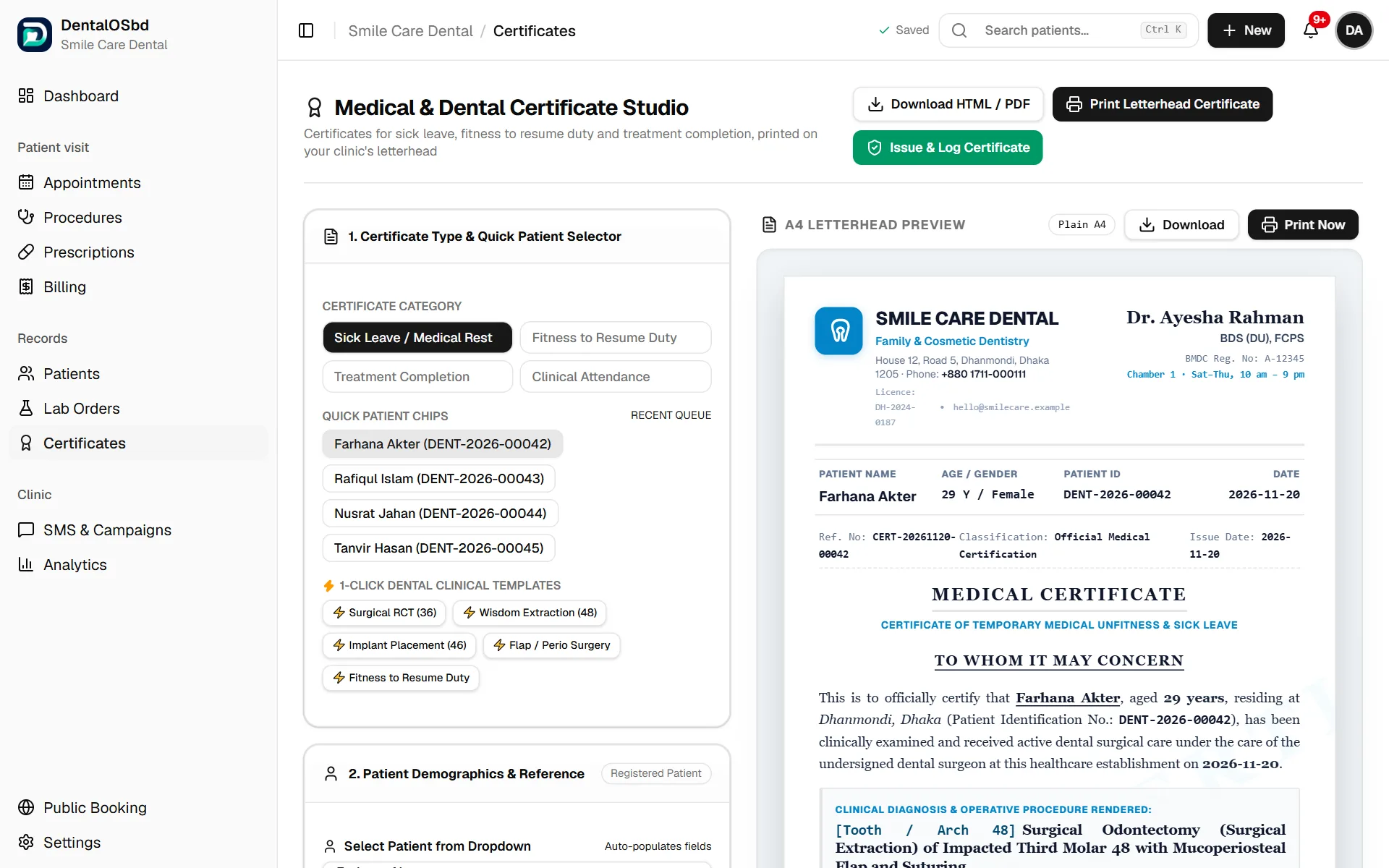
Issue a certificate
- Choose the Certificate category: Sick Leave / Medical Rest, Fitness to Resume Duty, Treatment Completion or Clinical Attendance.
- Pick the patient: click their name under Recent queue, or choose them from the patient list. Their name, ID, age, sex, phone and address fill in.
- Fill in the diagnosis, tooth, and the treatment given. For a common case, a template (for example Wisdom Extraction (48)) fills these in, including the number of rest days.
- For sick leave, set the Days of Rest and the Start Date. The End Date is worked out for you.
- Add any Clinical Advice & Limitations, such as no heavy lifting.
- If the clinic has more than one doctor, choose the Doctor signing.
- Check the preview on the right.
Print it
Under Print on, choose the paper:
- Plain A4 prints your clinic's full header on blank paper.
- Letterhead leaves the header off for your pre-printed pad. Enter the pad's Top and Bottom margins in millimetres. This is the same setting prescriptions use.
Click Print Letterhead Certificate, or Download to save a copy.
Keep a record
Click Issue & Log Certificate to save the certificate to the patient's file, so you can see later what was issued and when.
Tip: The clinic details on the certificate come from Settings → Clinic Setup, and the doctor's details from the doctors list there. If something is missing or wrong on the certificate, fix it there.
Still stuck?
Tell us what you were trying to do and what happened. A screenshot helps.