
Examination & Procedure
Record the examinations, procedures and surgery done in the visit from your price list, add medicines and disposables used, and take consent first when it's needed.
This is the second step of a visit, after the notes. Here the doctor (or assistant) records what was done: examinations, X-rays, procedures and surgery, each picked from your clinic's price list, plus any medicines and disposables used. Everything added here goes to the bill automatically, so the front desk doesn't have to ask what to charge.
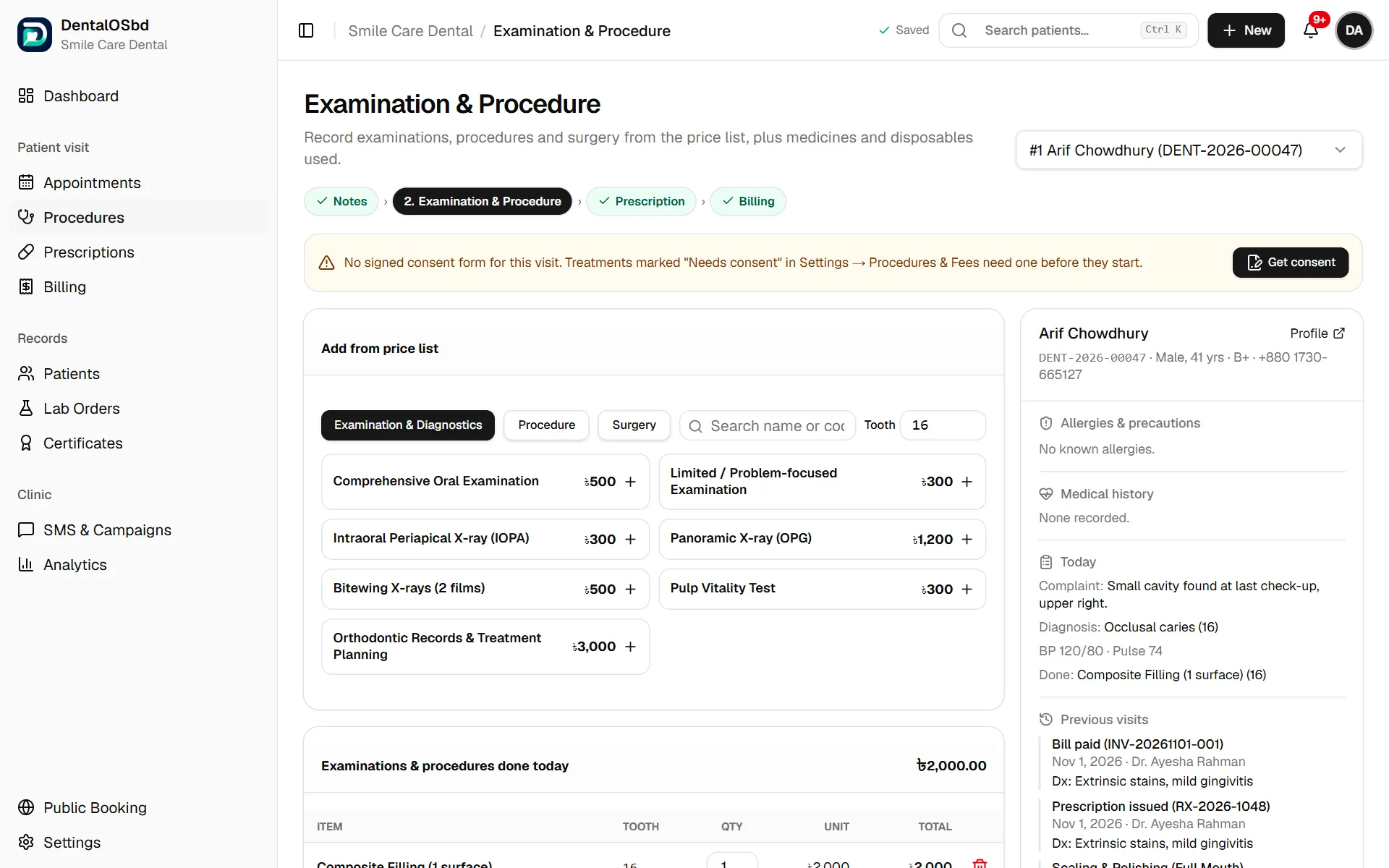
You reach it from the visit with Needs Procedure / Surgery, or from Procedures in the menu. The patient's details, allergies and previous visits are on the right.
Add what was done
- Under Add from price list, choose the tab: Examination & Diagnostics, Procedure or Surgery.
- Type the Tooth number (FDI, for example 36) if the item is for a particular tooth.
- Click the item, for example Composite Filling (1 surface). It's added to Examinations & procedures done today with its price.
- Change the quantity if needed, or remove an item with the bin icon.
Add medicines and disposables used
If you charge for materials used in the chair (anaesthetic cartridges, dressing material and so on):
- Under Medicines & disposables used, pick from the price list with Add item…, or type an Other item with its quantity and unit price.
- It's added to the list and to the running total.
Consent before treatment
Some procedures and surgeries are marked Needs consent in your price list. When one of them is in the visit and no consent form has been signed yet, a yellow note appears at the top:
- Click Get consent.
- The consent form opens, already filled in with the patient, doctor, clinic, procedure, tooth, anaesthesia and estimated cost. Check it, then print it.
- The patient (or guardian) and the doctor sign the printed form.
- Confirm both signatures in DentalOSbd. The visit can then move on.
If the patient refuses, record the refusal. It's saved with the date and the treatment declined.
Which procedures need consent, and the wording of each form, are set in Settings → Procedures & Fees and Settings → Consent Forms (see Lists & forms).
Finish this step
- Write anything else in Procedure notes.
- The Running total for billing shows what the bill will be. The consultation fee is added at billing.
- Click Save to keep your work, or Proceed to Prescription to move on.
Tip: Missing a treatment from the list? Add it once in Settings → Procedures & Fees with your price, and it's there for every visit after.
Still stuck?
Tell us what you were trying to do and what happened. A screenshot helps.