
Settings: Lists & forms
Your fee list, the medicine list and how instructions print, tests and X-rays, consent form wording, and how SMS and WhatsApp messages are sent.
The Lists & forms group in Settings holds the lists the visit is built from: what you charge, what you prescribe, which tests you order, the consent forms you print and the messages you send.
Procedures & Fees
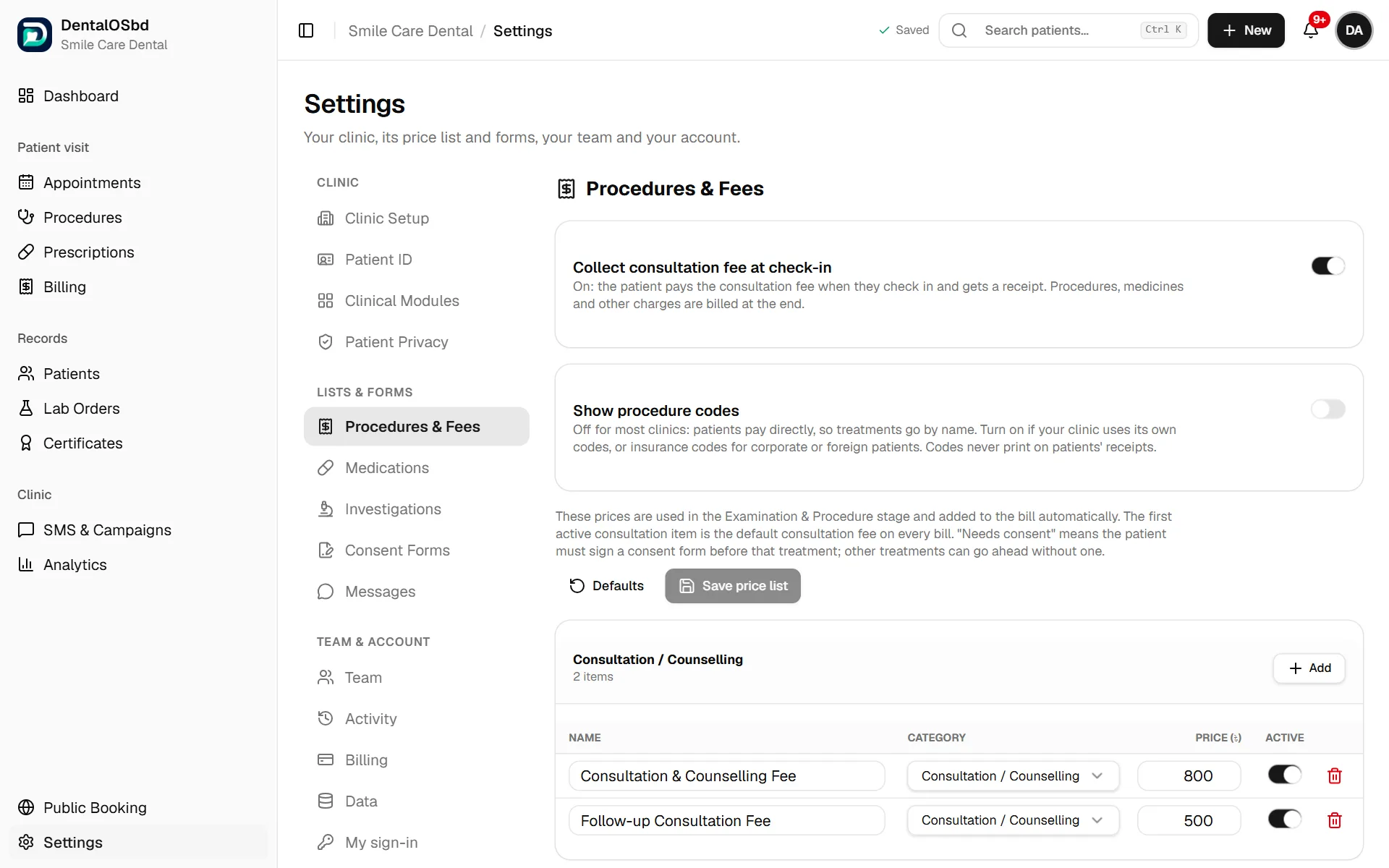
Your price list, in five groups: Consultation / Counselling, Examination & Diagnostics, Procedure, Surgery, and Medicine & Disposables. These are the items doctors pick in Examination & Procedure, and the prices go on the bill automatically.
- Change a price: edit it in the list, then click Save price list.
- Add a treatment: click Add in its group, type the name and price.
- Stop offering one: switch off Active. It disappears from the list doctors pick from, and old bills are unchanged.
- Needs consent: tick this for procedures and surgery that need a signed consent form before they start.
- The first active consultation item is the consultation fee used on every bill.
Two switches at the top:
- Collect consultation fee at check-in: when on, patients pay the consultation fee as they check in and get a receipt. Everything else is billed at the end.
- Show procedure codes: off for most clinics. Turn it on if you use your own codes or insurance codes. Codes never print on patients' receipts.
Medications
Medicine instructions on prescriptions: choose whether timings and durations print in Bangla, English, or both. The example on screen shows how a line will look.
Your medicine list: each doctor has their own list. Medicines you add are visible only to you.
- Choose whether prescriptions offer The app's list + my medicines (more than 1,500 Bangladeshi brands, with yours shown first) or Only my own list.
- Add a medicine to add one that isn't in the app's list, or to save your usual dose for one you prescribe often.
Investigations
The tests and X-rays doctors can add to a prescription: IOPA, OPG, CBCT, bitewing, blood sugar, CBC and so on. Each has a price, an indication and instructions for the patient.
- Add Investigation for a new one, and Edit or Delete existing ones.
- Reset Defaults brings back the original list.
Consent Forms
The forms printed when a doctor sends a patient for a procedure or surgery. There are four to start with: Dental procedure, Oral surgery / extraction, Orthodontic treatment, and Crown, bridge, denture or implant.
To change one:
- Pick it from the list.
- Edit the Title printed on the form and the Wording. Leave a blank line between paragraphs, and start a line with "- " for a bullet point.
- Click a detail such as
{{patient_name}},{{procedure}},{{teeth}}or{{estimated_cost}}to insert it. It fills in for each patient. Anything unknown prints as a blank line to fill in by hand. - Use Preview to see the printed page, then Save.
You can write the wording in Bangla. Duplicate copies a form, New form starts a blank one, and Restore original wording undoes your changes.
Messages
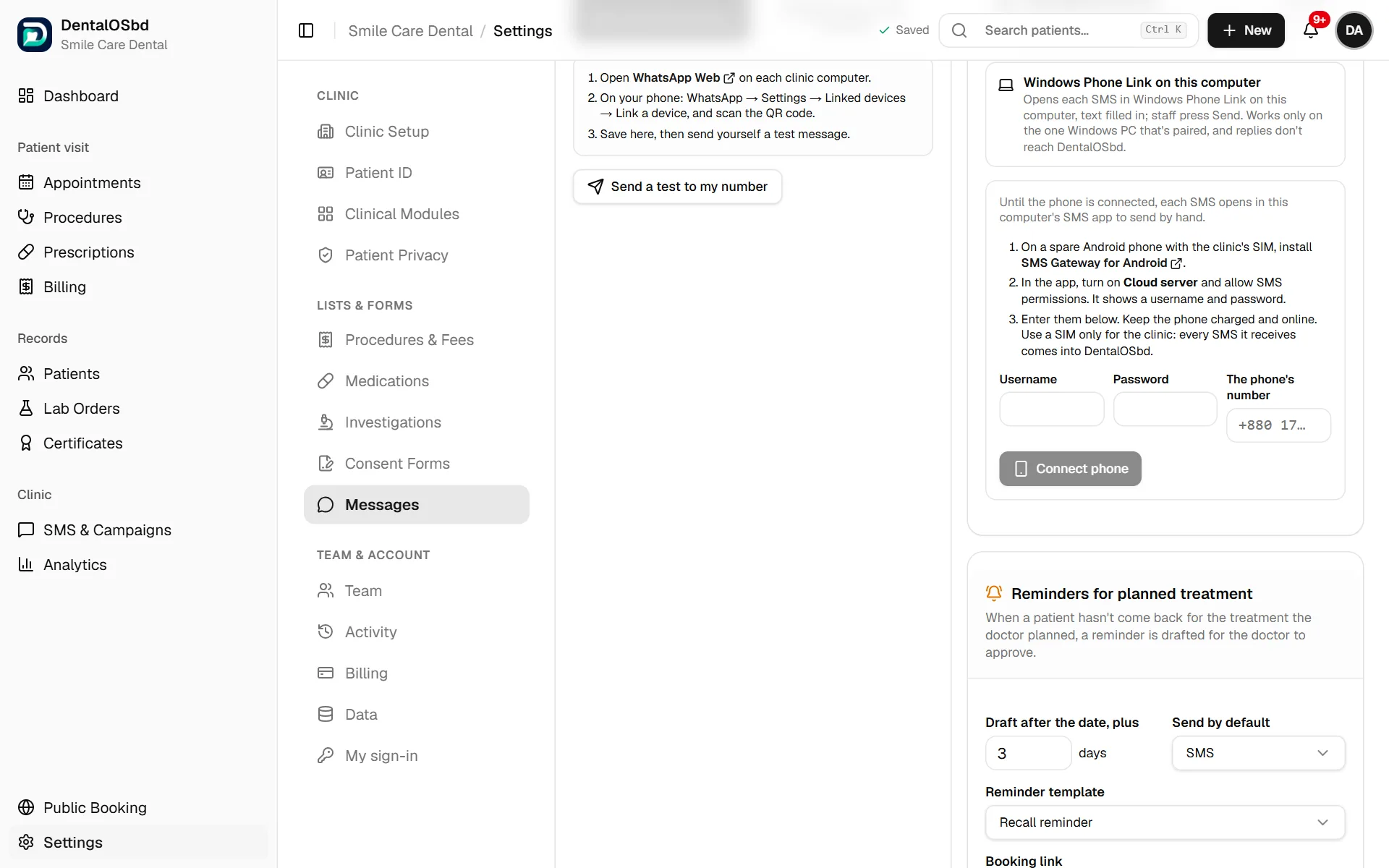
Enter the Clinic WhatsApp number and choose whether messages open in WhatsApp Web or the WhatsApp app on this computer. To use WhatsApp Web, link it once on your phone: WhatsApp → Settings → Linked devices → Link a device, then scan the QR code. Use Send a test to my number to check it works.
Sending SMS
Choose one way to send SMS. You can switch at any time.
- Android phone in the clinic (recommended): a spare Android phone with the clinic's SIM sends every SMS automatically, whichever computer staff are using, and patients' replies come into the Inbox.
- On the phone, install SMS Gateway for Android.
- In the app, turn on Cloud server and allow SMS permissions. It shows a username and password.
- Enter them here with the phone's number, and click Connect phone.
- Keep the phone charged and online, and use a SIM only for the clinic.
- SMS gateway service: sends through a bulk SMS company, with your clinic's name as the sender. Patients can't reply.
- Windows Phone Link on this computer: each SMS opens in Phone Link with the text filled in, and staff press Send. It only works on the one paired Windows PC, and replies don't come back.
Until one of these is set up, each SMS opens in the computer's own SMS app to send by hand.
Reminders for planned treatment
When a patient hasn't come back for a treatment the doctor planned, a reminder is drafted for the doctor to approve. Set:
- how many days after the planned date the reminder is drafted (Draft after the date, plus … days)
- whether it goes by SMS or WhatsApp by default
- which template it uses
- the booking link to include. Leave it blank to use your online booking page.
Message templates
Reminder templates are used for overdue treatment. Campaign templates are the presets on the SMS & Campaigns page. Edit the wording, or add your own, using details like {{first_name}} and {{clinic_phone}}. Bangla templates are included.
Still stuck?
Tell us what you were trying to do and what happened. A screenshot helps.